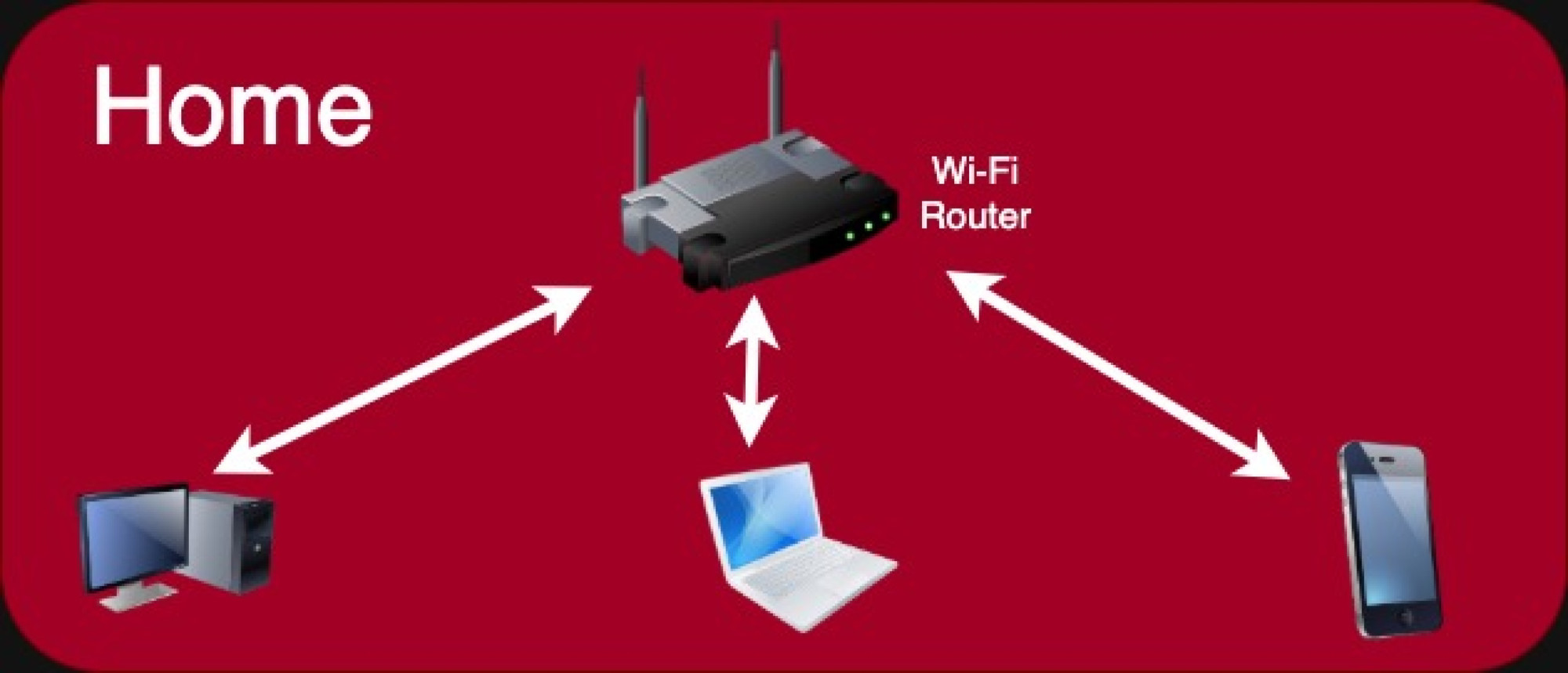
As I mentioned in the PC Hardware lesson, personal computers can connect to the network and other computers by using one or more types of network connection. There are three main technologies used to enable a network connection: Wi-Fi, Bluetooth, and a Wired Connection.
Wi-Fi
Wi-Fi is a family of wireless networking technologies which are used to connect a device (such as a PC or mobile device) to a Wi-Fi network and the Internet via a Wi-Fi router. Wi-Fi is often built into modern PCs today. Older computers can add Wi-Fi capability using a Wi-Fi adapter.
A Wi-Fi adapter is a device that adds wireless connectivity to a personal computer. Adapters are available as external USB modules as well as PCI or PCI Express (PCIe) cards that plug into an empty slot on the motherboard.
Bluetooth
Bluetooth is a lightweight communications technology that was initially created for wireless headsets. Common uses of Bluetooth technology for PCs include streaming audio to a Bluetooth speaker, and transferring files (such as pictures) between a mobile phone and a PC.
Bluetooth is primarily used to directly connect two local devices, not to access the Internet. The devices must be within 30 feet of each other for Bluetooth to work reliably.
Many modern PCs have Bluetooth built in, but like Wi-Fi, there are adapters available for older computers.

Wired Connection, using your Network Interface Card (NIC) network adapter
A network interface card enables the computer to connect to a local network. Nowadays, most desktop computers come with a NIC included, or in the case of laptops, a network adapter built directly into the motherboard. Some laptops do not have any direct network connectivity at all. They rely on Wi-Fi exclusively to connect to a network.
Home networks use Wi-Fi (wireless) or an Ethernet direct wired connection. Desktop computers usually support both methods. Laptops normally support Wi-Fi connectivity and a wired connection via a USB adapter. My MacBook Air works this way!
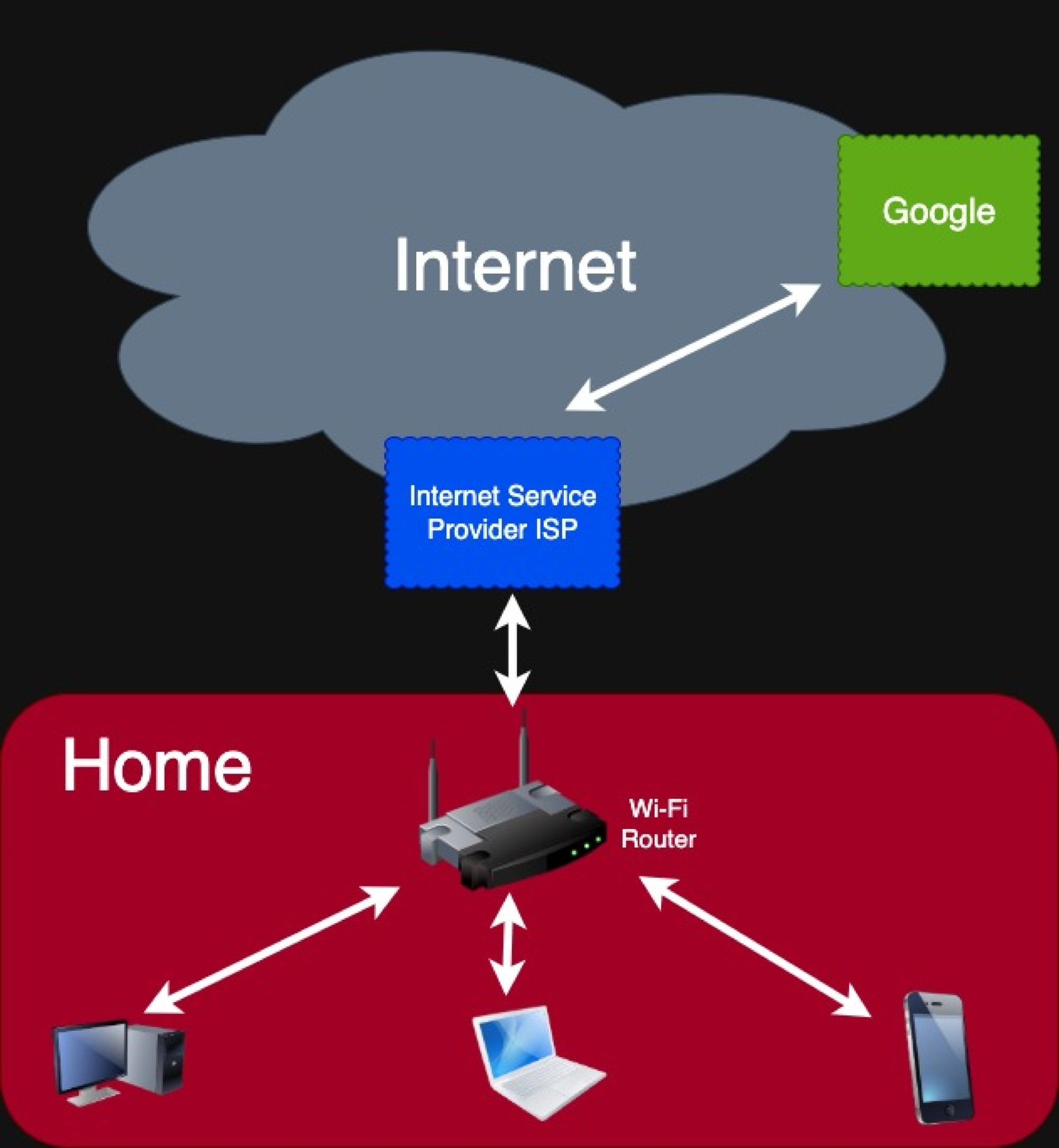
In home networks like the one depicted in the diagram below, the network topology is fairly straightforward. To start, a connection to the Internet is obviously the most important thing to address first. At our condo we use an Internet Service Provider (ISP) to provide the connection to the Internet.
The ISP company will install one or more devices in your home, depending on your needs. Most commonly, they will install a combination device called a Wi-Fi Router, which will provide the connection to the Internet, and enable your devices to connect to the Internet either by running a RJ45 Ethernet network cable from your desktop or laptop, or using Wi-Fi.
The service that we use, JCOM, does all of that, and also provides us with TV channels in a bundled package. Often these packages provide basic phone service too.
Ok, if you understood all of that you're a certified tech geek!
単語
“At our condo we use an Internet Service Provider (ISP) to provide the connection to the Internet.”
-
The ISP we use in our mansion in Tokyo is JCOM.私たちが東京の邸宅で使用しているISPはJCOMです。
-
Our ISP we use at our home in California is Comcast. They provide a lot of services but they are expensive.カリフォルニアの自宅で使用しているISPはComcastです。彼らは多くのサービスを提供しますが、それらは高価です。
“There are three main technologies used to enable a network connection: Wi-Fi, Bluetooth, and a Wired Connection.”
“Wi-Fi”
-
Wi-Fi is not an acronym. It is a trademarked phrase that means IEEE 802.11x, a specification published by the Institute of Electrical and Electronics Engineers.Wi-Fiは頭字語ではありません。 Institute of Electrical and Electronics Engineersによって発行された仕様であるIEEE 802.11xを意味する商標用語です。
-
It is dangerous to use WI-FI that is provided in public places like cafes. If you do, its best to use a VPN.カフェなどの公共の場所で提供されるWI-FIを使用するのは危険です。その場合、VPNを使用するのが最善です。
“In home networks like the one depicted in the diagram below, the network topology is fairly straightforward.”
-
The network topology of our company's LAN was documented last year, but now it is already obsolete.当社のLANのネットワークトポロジーは昨年文書化されましたが、現在はすでに廃止されています。
“There are three main technologies used to enable a network connection: Wi-Fi, Bluetooth, and a Wired Connection.”
“Bluetooth”
-
Both my smart phone and my laptop support Bluetooth, so I can transfer pictures between them.スマートフォンとラップトップの両方がBluetoothをサポートしているため、それらの間で写真を転送できます。
-
Bluetooth mesh continues to revolutionize the IoT by playing a pivotal role in the development of emerging markets such as Smart Building, Smart Industry, Smart Cities, and Smart Home.Bluetoothメッシュは、スマートビルディング、スマートインダストリー、スマートシティ、スマートホームなどの新興市場の発展に極めて重要な役割を果たすことにより、IoTに革命を起こし続けています。
“Home networks use Wi-Fi (wireless) or an Ethernet direct wired connection.”
“…which will provide the connection to the Internet, and enable your devices to connect to the Internet either by running a RJ45 Ethernet network cable from your desktop or laptop, or using Wi-Fi.”
-
Each computer has an Ethernet adapter to allow it to connect to the LAN.各コンピューターには、LANに接続できるようにするイーサネットアダプターが付いています。
“Wired Connection, using your Network Interface Card (NIC) network adapter”
“A network interface card enables the computer to connect to a local network.”
-
My old desktop computer has a NIC that connects it to my local LAN.私の古いデスクトップコンピュータには、ローカルLANに接続させるNICがあります。
-
Network cards have really come down in price in the last 10 years.過去10年間で、ネットワークカードの価格は本当に下がりました。
“As I mentioned in the PC Hardware lesson, personal computers can connect to the network and other computers by using one or more types of network connection.”
“There are three main technologies used to enable a network connection: Wi-Fi, Bluetooth, and a Wired Connection.”
-
I connected my new laptop to the network, and was immediately able to access the Internet.新しいラップトップをネットワークに接続すると、すぐにインターネットにアクセスできるようになりました。
“…technologies which are used to connect a device (such as a PC or mobile device) to a Wi-Fi network and the Internet via a Wi-Fi router.”
“Most commonly, they will install a combination device called a Wi-Fi Router, which will provide the connection to the Internet, and enable your devices to connect to the Internet either by running a RJ45…”
-
When building a small office network, the two most essential pieces of equipment you will need are switches and routers.小規模オフィスネットワークを構築する場合、必要となる2つの最も重要な機器は、スイッチとルーターです。
クイズ
このシリーズを読み終えました
これは「パソコン」の最後のレッスンです。
シリーズのページへこのレッスンはいかがでしたか?
ご質問やご感想をお気軽にどうぞ。すべて目を通しています。